


Pilot
4.626.52K Reviews
App Specs
- Version
- 7.13.0
- Updated On
- License
- Free
- Downloads
- 1,000,000+
- Developer
- Pilot Flying J
- Categories
- Travel & Local
- Platform
- Android, iOS
Screenshots
 Analysis by AppCompare
Long highway trips become much easier when fuel stops, food breaks, and rewards are handled in one place. I spent time with Pilot as a travel and local app from Pilot Flying J, and my impression is that it is most useful for drivers who already plan their journeys around Pilot locations. It is free to download and use, which makes it easy to try without committing money upfront, but its practical value depends heavily on whether the company’s travel centers fit your routes.
The app has been available since November 30, 2011, and its current version is 7.13.0. It supports devices running iOS or Android versions from 8.1 onward, so it is aimed at a wide range of phones rather than only the newest hardware. With an average rating of 4.6 from roughly 276,000 ratings and more than a million installs, it has clearly become a familiar road companion for many travelers. Those figures do not automatically make it right for everyone, though. I found that its strongest benefits appear during longer drives, especially when I want to make a deliberate stop instead of searching randomly from one exit to the next.
How Pilot fits into a real road trip
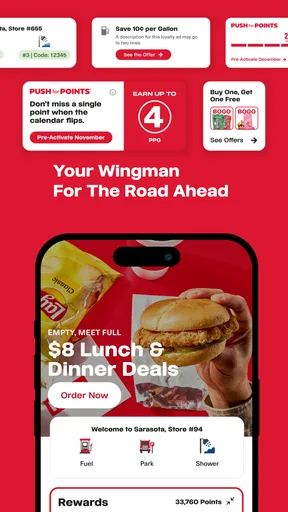
The basic idea is straightforward: use the app to organize parts of a journey connected to Pilot Flying J locations. Instead of treating fuel, meals, and loyalty activity as separate errands, I can approach them as one travel decision. That is a useful change in mindset. A fuel stop is no longer just a place to refill the tank; it becomes a chance to choose a location that also suits a meal break or rewards activity.
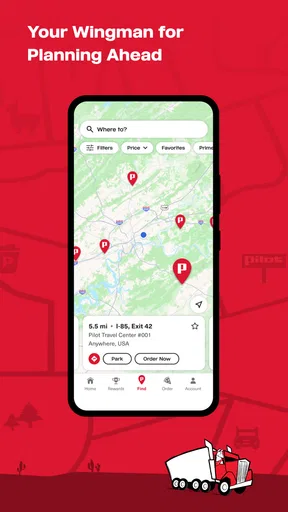
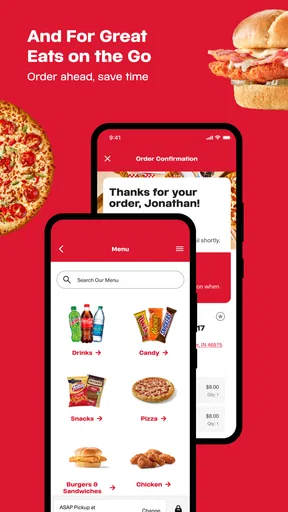
In a realistic everyday scenario, I might be driving several hours with a nearly empty tank and a passenger who wants food. A general map app can show fuel stations and restaurants, but it may leave me comparing several unrelated businesses. Pilot is more focused: I can look for a Pilot stop and consider the available road-break options together. That saves mental effort, particularly when I am driving a familiar interstate route and do not want to make multiple searches while moving.
I would not use it as a complete replacement for a normal navigation app. A dedicated navigation tool is usually better for turn-by-turn guidance, traffic conditions, alternate routes, and the final details of getting from one address to another. Pilot serves a narrower purpose. I see it as a stop-planning companion rather than the main brain of an entire journey.
That distinction matters because the app’s usefulness starts before the vehicle reaches a travel center. The best workflow is to check the route during a safe planning moment, decide which stop makes sense, and then return to driving. I would avoid interacting with any travel app while the vehicle is moving. The app can reduce planning friction, but it cannot remove the need for responsible driving.
What the free download really gives you
The price is one of Pilot’s clearest advantages: the app is free. That means I can install it, explore its travel-focused tools, and decide whether it belongs in my routine without paying for access. For an occasional road-tripper, that low barrier is important. There is no need to buy a dedicated trip-planning product simply to see whether a branded travel-center app is useful.
Worth Reading Before You Choose

EA SPORTS FC Mobile 26 Is a Bigger Football Game, but It Takes Time

Flipboard Shows What News Apps Must Do Beyond the Feed

Switching to Android Auto Means Rethinking Your Driving Routine

Google Calendar Makes a Crowded Week Easier to Manage

Ludo King Makes the Most of the Minutes Between Plans

Baby Panda World Brings Quick Play to Modern Phones, but Its Game Library Feels Busy
Free access should not be confused with universal value. The app is most worthwhile when I regularly pass Pilot Flying J locations or want to use the company’s rewards ecosystem. If my routes rarely include those stops, the download may occupy space without solving many problems. A general maps app could be more useful for finding whatever fuel station, restaurant, or rest opportunity happens to be closest.
I also appreciate that the cost question is uncomplicated from a user’s perspective. I can test the app on a short trip and judge its usefulness through actual stops rather than making a financial decision first. That makes it suitable for families preparing for a holiday drive, occasional interstate travelers, and professional drivers who want to evaluate a dedicated road-stop tool before building it into their routine.
The app carries a Mature 17+ content rating. That is worth noticing for households where a younger traveler may handle the phone or where parents are choosing apps for a shared device. The rating does not change the road-planning purpose I experienced, but it is part of the installation decision and should not be overlooked simply because the app belongs to the Travel & Local category.
Where the value becomes practical
The strongest value comes from combining several small decisions. Fuel planning alone is useful, but fuel plus food plus rewards can make a stop feel more intentional. Rather than stopping at the first available station, I can think about whether a particular Pilot location fits the timing of the trip and the needs of the people in the car.
One non-obvious advantage is reduced decision fatigue. On a long drive, the problem is not always finding one place. It is comparing fuel, food, timing, and convenience while tired. A focused app can narrow that search. I still need to make the final judgment, but I am starting with a travel-center network instead of an enormous list of unrelated map results.
A second useful insight is that the app works best when used as part of a stop rhythm. I would check it before leaving, identify a likely break, and then reassess after a few hours rather than repeatedly searching at every exit. This approach keeps the app from becoming a distraction and turns it into a simple planning tool. It is particularly helpful when a driver wants fewer unplanned stops.
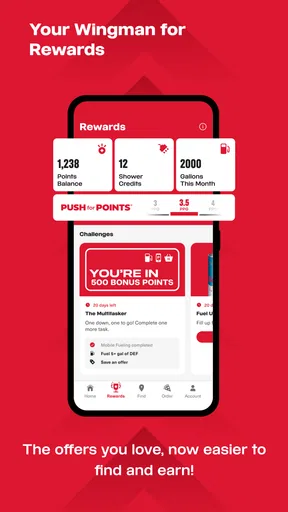
A third trade-off involves loyalty. If I already choose Pilot locations, having rewards activity connected to the same app can make the routine feel more organized. If I do not care about rewards or do not visit the network often, that part of the experience has much less influence on my decision. In other words, the app’s value grows with repeated, relevant use rather than with installation alone.
For a professional driver, the appeal is easy to understand. Repeated routes make familiarity valuable, and a dedicated app can be more convenient than starting from scratch in a general map every day. For a family driver, the value is different: the app can help coordinate a fuel stop with a meal break. For a casual city driver, however, it may be unnecessary because a local maps app is likely to cover nearby needs more broadly.
How it compares with ordinary map and travel apps
General map apps win on breadth. They usually make more sense when I need to compare every available fuel brand, independent restaurant, supermarket, rest area, and roadside service in a wide area. They are also the better choice when the destination is a specific address rather than a branded travel center.
Pilot wins on focus. Instead of presenting an overwhelming collection of possibilities, it centers the journey around Pilot Flying J stops and the related fuel, food, and rewards experience. That focus can be a strength on a long highway drive, where I may prefer a dependable planning pattern over endless browsing.
The trade-off is network dependence. A general map app can help me choose based on distance, price, opening information, or personal preference across many businesses. Pilot is a more specialized tool, so I would not expect it to replace that broader comparison. My preferred setup would be to use Pilot for identifying relevant stops and a general navigation app for the complete route, traffic context, and final directions.
This two-app approach may sound less convenient, but it is actually clearer. Each app has a defined job. Pilot handles the branded travel-stop relationship, while the navigation app handles the road itself. Trying to force one app to do everything can create frustration, especially when a driver needs information outside the Pilot network.
Small workflow choices that improve the experience
I recommend checking the app before starting the engine, not after the trip is already underway. I can decide how far I want to drive before the next break, consider whether fuel and food should happen together, and then put the phone away. This is a simple habit, but it makes the app more useful and safer.
Another practical approach is to plan around the passenger’s needs rather than fuel alone. A driver may have enough fuel for another stretch but still need a meal or a rest. Conversely, stopping only because the app shows a location can create unnecessary interruptions. I found the best results came from treating the app as a source of options, not as an instruction to stop immediately.
I would also avoid assuming that a branded app automatically provides the broadest or most current picture of the road. Before a long trip, I would still review the whole route in a navigation tool and keep an eye on changing travel conditions. Pilot is helpful for the stop decision, but it should sit inside a wider travel plan.
Finally, I would install it on the phone I actually use for travel and allow time to become familiar with its layout before a major journey. Learning any app at the roadside, under pressure, is a poor experience. A short trial on a normal errand can reveal whether its location and rewards workflow suits the way I travel.
Where the experience may feel limited
The main limitation is not that Pilot lacks a clear purpose; it is that the purpose is narrow. If I want independent businesses, local attractions, public transportation, walking directions, or a complete city guide, this is not the app I would reach for first. Its identity is tied to highway travel and Pilot Flying J locations, so users outside that context may find it less useful.
There is also a possible planning compromise for people who compare every option. A specialized network app can make a trip feel simpler, but simplicity may come at the cost of variety. I may miss a cheaper, closer, quieter, or more personally suitable alternative if I look only within one branded network. For some travelers, that is an acceptable trade; for others, it is a reason to rely primarily on a broad maps service.
Rewards can also change how people judge the app. Someone who frequently visits Pilot locations may consider the rewards connection a meaningful reason to keep it installed. Someone who travels infrequently or changes fuel brands based on convenience may see less benefit. I would not choose the app solely because rewards exist in the concept; I would choose it if my actual driving habits make those rewards and stops relevant.
The Mature 17+ rating may be another point of friction for families managing app access. Even though the app is travel-oriented, parents should check that it fits their household’s device rules before handing a phone to a younger user. That is a small consideration, but it is part of making a sensible installation choice.
Who should install it
I think long-distance drivers are the clearest audience. If a regular route includes Pilot Flying J locations, the app can bring fuel, food, and rewards planning into one place. It is also a sensible trial for people preparing for a road trip who want a free, focused tool rather than another paid travel purchase.
Families can benefit when different passengers have different priorities. One person may care about fuel, another about food, and another about keeping the journey organized. The app does not eliminate every travel decision, but it can give the group a shared stop framework. That is more useful than separately searching for a gas station and then trying to find a suitable meal at the last minute.
Professional drivers may appreciate the repeatability of a dedicated network app, particularly when their routes make Pilot locations a regular part of the working day. The value is less about novelty and more about reducing repeated planning. A tool becomes worthwhile when it saves small amounts of effort over many trips.
I would tell occasional local drivers to think twice. If most journeys are short and urban, a general maps app may be more versatile and may already cover the needed fuel and food searches. Likewise, travelers who want to compare every possible business should keep a broad navigation tool at the center of their setup.
My final recommendation
My verdict is positive but specific: I recommend Pilot to drivers whose routes naturally include Pilot Flying J travel centers and who want a free way to coordinate fuel, food, and rewards decisions. The app is not a universal travel planner, and I would not install it expecting it to replace navigation, traffic tools, or a broad local-search service.
Its best quality is focus. By concentrating on a particular road-stop experience, it can make a long drive easier to organize and reduce the number of separate searches I need to make. Its biggest weakness is the same focus: travelers who do not use Pilot locations regularly will receive less practical value from it.
The developer, Pilot Flying J, has maintained the app across many years, and the current 7.13.0 release gives users a modern entry point into that travel routine. With a free price, a strong average rating of 4.6, and more than a million installs, it is easy to justify trying if the network matches your routes. I would install it before a long highway trip, test its workflow while parked, and keep it only if it genuinely improves the way I choose stops.
My buy-or-skip advice is simple: there is nothing to buy, so try it when Pilot locations are part of your normal travel. Keep it as a specialized road companion if it saves planning time; skip it in favor of a general map app if you need broader choices or rarely pass through the network.
Pros
- Simple flight controls make it easy for beginners to get started.
- Short missions are convenient for quick gaming sessions.
- Multiple aircraft provide variety as you progress.
- Offline play is useful when you have no internet connection.
- Responsive controls make landings and takeoffs feel satisfying.
Cons
- Progression may feel repetitive after playing the same mission types.
- Some aircraft or upgrades can require considerable grinding.
- The small screen can make precise maneuvers difficult at times.
- Visual details may look basic on older or budget devices.
- Ads may interrupt gameplay for users on the free version.
FAQs for Pilot
What is Pilot, and what can I use it for?
Pilot is an application designed to help users manage and organize their travel-related activities in one place. Depending on the version and platform, it may support trip planning, itinerary organization, destination discovery, and sharing plans with other people. Before downloading, check the current app description and supported features, since availability can vary by region, device, and subscription level.
Is Pilot free to download and use?
Pilot can generally be downloaded without an upfront charge, but some features may require in-app purchases, a subscription, or access to a premium plan. The free version may include basic planning and organizational tools, while advanced options can be restricted. Review the pricing information in the Google Play Store or App Store before confirming a purchase.
Does Pilot require an internet connection?
Pilot may need an internet connection for downloading content, synchronizing plans, loading destination information, signing in, and sharing updates with other users. Some previously saved itinerary details might remain accessible offline, but offline availability should not be assumed for every feature. If you are traveling, open and synchronize your plans before leaving reliable internet access.
Can I use Pilot to collaborate with friends or travel companions?
One of Pilot’s useful purposes is organizing travel information with other people, although the exact collaboration tools depend on the current app version. You may be able to share plans, coordinate activities, or invite companions to view or edit trip details. Check the required permissions and account settings, especially if you prefer to keep your itinerary private.
Is Pilot safe to install, and what permissions does it request?
Pilot should be downloaded only from the official Google Play Store or Apple App Store to reduce the risk of receiving a modified or unsafe version. During setup, review requests for notifications, location, contacts, calendar access, or storage, and allow only permissions that match the features you intend to use. Also read the privacy policy to understand how personal and travel data are handled.


